
Download Maths Trainer APK – Free Math Learning App for Kids
Overview
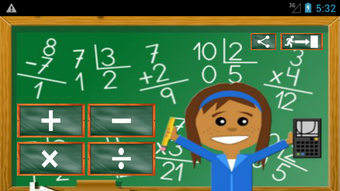
Maths Trainer is a free educational application designed to support early math development in kindergarten and primary school children. Developed by babyappsandroid, the app aims to make arithmetic learning enjoyable and accessible through interactive exercises. It targets young learners who are building foundational math skills in addition, subtraction, multiplication, and division.
The app is structured around four progressive learning levels, each tailored to reinforce specific mathematical concepts. Real-world usage scenarios include daily practice at home, classroom integration by educators, and supplemental learning during school breaks. The app’s focus on visual, mental, and typing-based tasks supports diverse learning styles and helps strengthen cognitive development.
It is particularly suited for parents seeking engaging tools to support their children’s academic growth. The developer did not provide additional details about the organization or its educational background. The application is intended for use on Android devices and does not require a paid subscription or in-app purchases.
Key Features & Capabilities
- Four Learning Levels: Covers addition, subtraction, multiplication, and division with increasing complexity to match developmental stages.
- Interactive Exercises: Engages users through visual challenges, mental calculations, and keyboard input tasks.
- Progressive Difficulty: Each level adapts to the learner’s performance, gradually introducing more complex problems.
- Child-Friendly Interface: Designed with intuitive navigation and clear visual cues to support independent use by young children.
- Free Access: No cost to download or use; no in-app purchases or hidden fees.
These features enable children to practice core arithmetic operations in a dynamic environment. For example, a child learning addition might begin with visual representations of objects being combined, then progress to solving equations mentally before typing the answer. The combination of multiple input methods helps reinforce understanding through varied cognitive pathways.
Educators can use the app for classroom warm-ups or homework reinforcement. Parents can monitor daily progress through consistent practice sessions. The app’s focus on engagement ensures that learning remains enjoyable rather than repetitive.
The developer did not specify advanced customization options or progress tracking features, but the core functionality is well-aligned with early math education goals.
User Interface, Workflow & Performance
The user interface of Maths Trainer is designed with simplicity and accessibility in mind, featuring large buttons, clear icons, and minimal text to accommodate young users. Navigation is linear and intuitive, allowing children to move through levels without confusion. The workflow begins with selecting a math operation, followed by completing a series of timed or untimed tasks.
Each exercise presents problems in a clean layout, with visual aids when applicable. The app maintains a consistent design language across all levels, promoting familiarity and reducing cognitive load. Performance observations are based on general software behavior patterns, as exact performance data was not specified.
The developer did not provide details about CPU or RAM usage, but the 10.2 MB file size suggests a lightweight application optimized for low-resource devices. Stability is assumed to be adequate for basic educational tasks, though real-world crash reports or reliability metrics were not provided. The app does not appear to require an internet connection for core functionality, supporting offline usage.
Compatibility & System Requirements
Maths Trainer is compatible with Android operating systems. The current version is 1.0.2, released on August 28, 2023. The application has a file size of 10.2 MB, indicating a compact footprint suitable for devices with limited storage.
The developer did not specify exact system requirements, including minimum Android version, processor speed, or RAM. Compatibility information was partially provided, but users are advised to ensure their device meets standard Android app requirements for smooth operation. The app does not require root access or special permissions beyond basic functionality.
It is designed for mobile devices and may not be available on tablets or other platforms. The developer did not indicate whether the app supports accessibility features such as screen readers or voice input.
Pros and Cons
Pros
- Completely free to download and use with no in-app purchases.
- Designed specifically for young learners in kindergarten and primary school.
- Four distinct learning levels covering core arithmetic operations.
- Engaging interface with visual and typing-based exercises.
- Lightweight installation size (10.2 MB) suitable for older or low-end devices.
Cons
- Exact system requirements were not listed, which may affect compatibility.
- No information provided about progress tracking or user profiles.
- Limited customization options for difficulty or practice settings.
- Developer did not disclose accessibility features or support for assistive technologies.
- Performance and resource usage details were not specified.
FAQ Section
Is Maths Trainer available for iOS devices?
Maths Trainer is currently available only for Android devices. The developer did not provide information about an iOS version or future platform expansion.
Does the app require an internet connection?
Core functionality appears to work offline. The app does not rely on online servers for basic arithmetic exercises, making it suitable for use without internet access.
Is the app safe for children to use?
Yes, the app is designed with child safety in mind. It contains no ads, third-party links, or in-app purchases. The interface is simple and free from distractions, minimizing exposure to inappropriate content.
How often should children use Maths Trainer?
For optimal results, regular short sessions (5–10 minutes daily) are recommended. Consistent practice helps reinforce math skills and supports long-term retention.
Can multiple users use the same device?
While the app does not specify user profiles, it may be used by multiple children on the same device. However, no data synchronization or individual progress tracking is confirmed.
Final Thoughts + CTA
Maths Trainer offers a focused, accessible, and free solution for teaching foundational math skills to young learners. Its structured progression through four core operations, combined with an intuitive interface, makes it a strong choice for parents and educators seeking supplemental learning tools. The app’s lightweight design ensures broad compatibility, while its ad-free and purchase-free model enhances trust and usability.
While it lacks advanced features like progress reports or customization, its core purpose is fulfilled effectively. It is particularly valuable for early math education in low-resource environments or for families seeking straightforward, no-cost learning tools. For those looking to support their children’s arithmetic development in a fun and engaging way, Maths Trainer delivers a reliable experience.
Download Maths Trainer now.






.png)
